Publishing
Publish from Claude Code
Take something you built in Claude Code and put it online, images and all.
Working on a real project in Claude Code? Ask Claude to publish the folder and the whole thing goes live. Repeat publishes only send what changed.
Start with a Claude Code folder
The easiest way to work is a PageSumo studio: a folder in Claude Code where you build your pages and sites, set up with one paste.
- 1
Open Code in the Claude app and pick a folder
Start a new session and choose where your pages will live. A new folder called PageSumo in Documents is a good home.
- 2
Paste this into the chat
Claude Code connects PageSumo if it isn't already, and sets the folder up.
Run this https://app.pagesumo.com/setup - 3
Your browser opens: sign in and click Connect Claude Code
Back in Code, ask for what you want. It builds it, shows it to you, and publishes when you say so, all in the same session.
In your studio:
- Each page or site gets its own subfolder, so Claude Code always knows which thing you mean.
- Claude Code asks what you want, builds it, opens it for you to look at, and publishes only when you say so.
- It checks what you ask for against your plan first, so you hear that a site needs a bigger plan before it is built, not after.
- After the first publish, it remembers where each thing went, so "update my ebook page" replaces the live page at the same link instead of making a copy.
More detail, including what to do if the browser link expires, is in Connect Claude under Claude Code.
Already have a project folder? The steps below work in any folder, studio or not.
When a session gets long
A Claude Code session can only hold so much. To see how full yours is, hover over the small circle next to the model name at the bottom of the Claude app. The first line shows how much of this session you've used.
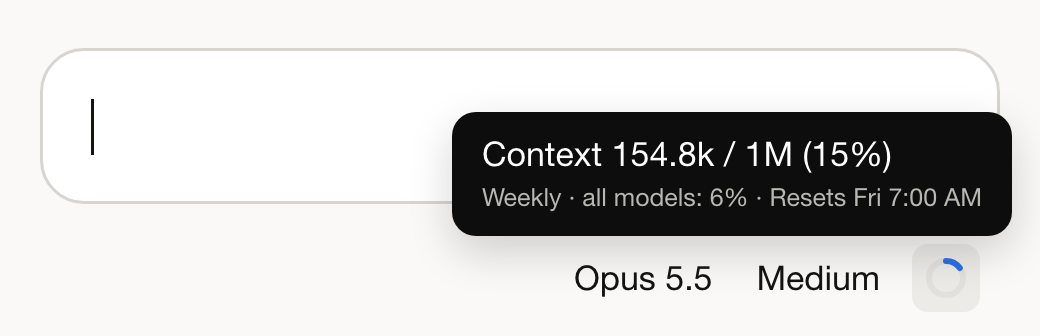
Once it passes 50%, start a fresh session. Claude does its best work in a session that isn't crowded, and past halfway it can start forgetting things you told it earlier. To start fresh:
- Ask Claude: "Give me a short summary of where we are and what's left to do."
- Copy that summary.
- Start a new Claude Code session in the same folder, paste the summary, and keep going.
Nothing you built is lost. Your pages, images, and live links all stay in the folder, so "update my ebook page" still updates the same link from the new session.
A good habit: one session per page or site. Starting a new page or site? Start a new session, even if the last one isn't full.
Publish your folder
- In Claude Code, ask Claude to publish your project folder.
- Claude uploads it and replies with your live URL.
A folder with one HTML file publishes as a page. A folder with several linked HTML files publishes as a site, where each file becomes a page at its folder path and the main file becomes the homepage. See Build a site.
To update, ask Claude to update it by name. Claude looks up what you've published and replaces the files at the same address, so shared links keep working.
Updating a site is a sync, and a file you removed from the folder removes that page from the live site, along with its leads and stats. Send the whole folder every time.
Keep images as real files
Keep each image as its own file in the folder, referenced by a relative path like images/hero.png. Two rules follow from that:
- Never let Claude paste an image into the page as encoded text. Files upload directly and their size is never a problem; pasted-in image data bloats the page itself.
- If a page uses an image at an outside web address, for example from an AI image generator, have Claude download it into the folder first and point at the local file. Those generator links expire. An image shipped as a file in your folder is hosted by PageSumo and never expires.
Get this right and the image warnings below can't happen to you.
Warnings Claude might show after publishing
Your page is live. A warning means something is worth fixing. From a folder, two pieces of advice cover nearly all of them:
- Ship images as real files. Every image warning comes from pages pointing at outside image links.
- Remove any pasted API key (a secret code, like a password, that lets one product use another company's service) and update the page. Anyone can read a published page's source. If your page is meant to call Claude, there's a safe way: see Pages that use AI.
The full warning-by-warning glossary is in Fix common problems.
Common questions
Chat or Claude Code? Both end at the same live page, so pick by the shape of the work. A chat suits a single page made in conversation. Claude Code suits real projects: many files, folders of images, whole sites, things you'll keep working on. Images upload as their own files here, so chat publishing's image limits never apply.
Are there size limits? One publish can include up to 200 files, each up to 100 MB, so full-size images and video are fine. The first publish sends everything; after that only changed files upload, so repeats are fast.
Does it handle more than HTML?
Yes. Stylesheets, scripts, fonts, images, and favicons all come along. A static export from a framework, like a Next.js out/ folder or an Astro dist/ folder, publishes as a working site.
Can I publish a folder onto an existing page? Yes. The page grows into a site: it becomes the homepage and keeps its address, views, and leads.
My images look slightly different on the live page. That's deliberate. Images are optimized as they're served: converted to a modern format for the visitor's browser, scaled if very wide, and recompressed for speed. Your original file is stored unchanged.
The publish was refused for having too many pages. Each plan caps how many pages one site can hold. The message names your limit. See Plans and limits.